
Coming soon to the App Store for iPhone, iPad and Mac
Measured, quoted and invoiced before you’re back in the van.
ProMeasure is one app for the whole job. Scan the room with your iPhone, price the work at the kitchen table, send a proper invoice, and keep your books ready for Making Tax Digital.
You’re on the list.
We'll email the day ProMeasure is on the App Store.
08:30On site
Scan the room once. Measure everything from it.
Walk round the room with an iPhone Pro or iPad Pro. The LiDAR sensor captures it in 3D as you go, furniture and all, and ProMeasure finds the walls, doors and windows in the scan. You scan over the sofa, not around it.
- True Scan
- A full 3D scan you can walk through or spin round afterwards, as a solid model or a point cloud.
- Floor plans
- Measured plans drawn from the scan, with walls, openings and dimensions. Fix an edge by hand and it stays fixed.
- AR tape measure
- Point at two spots and read off the distance. Every measurement is saved against the job.
- No LiDAR? No problem
- Build the room from tape or laser readings instead. It pairs with a Leica DISTO over Bluetooth.
- Old drawings
- Photograph a paper plan and trace it into a measured room.
- Site photos
- Every photo is stamped with when and where it was taken, and filed with the job.
Take it with you
- PDF Plan packs
- DXF CAD
- IFC BIM
- GLB 3D model
- USDZ 3D model
- CSV Room data
09:10Still on site
Heat loss from the rooms you just measured.
Fitting a heat pump or sizing a boiler? ProMeasure works out the heat loss room by room from the sizes in your scan and the U-values you set, then produces the MIS 3005-D report to hand over.
Heat loss by room
MIS 3005-D report
| Room | Area | Design | Heat loss |
|---|---|---|---|
| Living room | 16.3 m² | 21°C | 1,240 W |
| Kitchen | 10.9 m² | 18°C | 880 W |
| Bedroom 1 | 12.6 m² | 18°C | 760 W |
| Hall | 4.6 m² | 18°C | 520 W |
| Bathroom | 5.2 m² | 22°C | 410 W |
| Whole house | 3,810 W |
09:40Kitchen table
Price it while you’re still sat with them.
Pick items from your own price list, or talk the job through and let ProMeasure draft the quote from what you said. Nothing goes anywhere until you've checked every line.
The customer's PDF builds as you type, with your logo and details, in one of four styles. When they say yes, one tap turns the quote into an invoice. No retyping, and the numbers can't drift apart.
Drafting a quote from your voice happens on the phone itself, using Apple Intelligence, so it needs an iPhone that supports it. Everything else works without.
10:15Back in the van
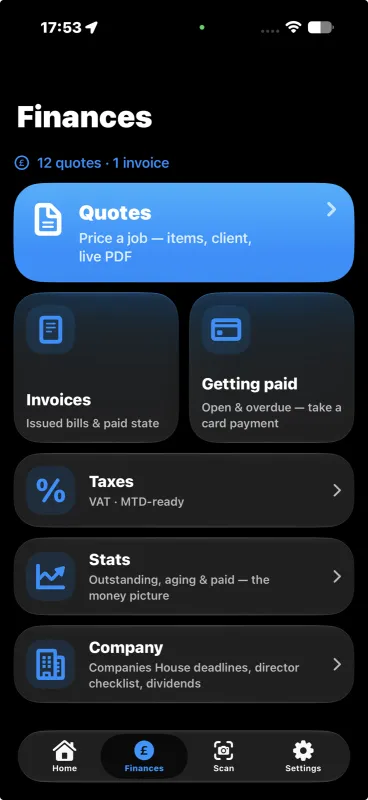
Know who owes you, and how much.
One screen shows what's outstanding, what's overdue and what came in this month. Record a payment against its invoice, by card, cash or bank transfer, and the books update themselves.
Receipts in a snap
Photograph a receipt at the merchant's counter. The phone reads it and files the expense, no typing.
A till for counter sales
Ring up sales from your own catalogue and hand over a proper receipt.
Bank statements, sorted
Import a statement and ProMeasure sorts the transactions, learning your regular suppliers as it goes.
Coming Taking card payments on the phone itself. It's built and being tested, and we'll switch it on once it has cleared its last approvals.
Every quarter
Your invoices and receipts are already your tax records.
Making Tax Digital means keeping digital records and sending HMRC updates from software. ProMeasure keeps those records while you work, so the quarter is mostly done before it ends.
From the app you'll file VAT returns, Income Tax quarterly updates and your year-end. You sign in to HMRC with your own Government Gateway details, and we never see your password.
Where HMRC filing stands
Built to HMRC's Making Tax Digital specifications and tested end to end in HMRC's sandbox. HMRC's approval for live filing is in progress. Live filing gets switched on once that approval is through, and not before.
Income Tax quarterly updates are due
- 7 Aug
- 7 Nov
- 7 Feb
- 7 May
ProMeasure keeps track of them for you.
CIS, from both sides
Log what contractors take off your payments so it counts against your tax bill. If you pay subcontractors, keep their details and your monthly returns in the same place. Sending CIS returns straight to HMRC is coming. Until then, ProMeasure gives you the figures to file on HMRC's CIS online service yourself.
VAT return
1 Apr to 30 Jun
| 1 VAT due on sales | £4,860.00 |
|---|---|
| 2 VAT on goods from the EU (NI only) | £0.00 |
| 3 Total VAT due | £4,860.00 |
| 4 VAT reclaimed on purchases | £1,212.40 |
| 5 Net VAT to pay | £3,647.60 |
| 6 Total sales, excluding VAT | £24,300 |
| 7 Total purchases, excluding VAT | £6,062 |
| 8 Goods to the EU (NI only) | £0 |
| 9 Goods from the EU (NI only) | £0 |
All nine boxes checked. Ready to send to HMRC.
Every year
Run a limited company? The company paperwork’s in there too.
Put in your company number and ProMeasure pulls your filing dates from Companies House, then reminds you before each one.
- Dividends
- Record a dividend and get the voucher to go with it.
- Corporation Tax
- An estimate of the Corporation Tax on the year so far, so you know what to put aside.
- Director's loan
- Keep track of money in and out of the company that's yours, with a warning before it costs you.
- Sole trader instead?
- The app shows the figures that matter for you instead: Income Tax and National Insurance to set aside.
Your company's year
Example: a company with a 31 March year end
- 31 Mar Year end Accounting year closes
- 28 Jul Confirmation statement Filed with Companies House
- 31 Dec Annual accounts Due at Companies House
- 1 Jan Corporation Tax Payment due to HMRC
- 31 Mar CT600 return Due to HMRC
The phone for site. The Mac for the desk.
One app across your Apple devices, kept in step through your own iCloud.
-
iPhone
Everything, on site. LiDAR scanning on iPhone Pro models; quoting, invoicing and tax on any iPhone that runs iOS 26.
-
iPad
The same app with room to spread out. LiDAR scanning on iPad Pro.
-
Mac
A proper Mac app for the office: quotes, documents and the tax on a big screen. Needs macOS 27.
ProMeasure Cloud is a web workspace for the office at app.promeasure.co.uk, where bills and receipts are read automatically and filed against jobs. It's invite-only for now.
Your books stay yours.
Your jobs, customers, quotes, invoices and tax figures live on your phone and in your own private iCloud. We don't keep a copy of your books on our servers.
Read the privacy policy. It's one page, in plain English.
-
No tracking of any kind
No analytics, no advertising, no profiling. Not in the app, and not on this website either. This site sets no cookies.
-
Your HMRC password stays with you
You sign in to HMRC through Government Gateway. ProMeasure never sees your password.
-
Card details go to Stripe
Card payments run through Stripe, so card numbers never pass through us.
-
Works in a basement
Records save on the phone first, so a job with no signal is still a job on the books.
Straight answers
When does ProMeasure launch?
We haven't set a date yet. Put your email in and you'll hear the day it's on the App Store.
How much will it cost?
Pricing isn't settled yet. We'll publish it before launch, and people on the list will hear first.
Do I need an iPhone Pro?
Only for LiDAR scanning. Everything else, from quotes and invoices to tax and the company tools, works on any iPhone or iPad running iOS 26 or later, and on the Mac.
Is it recognised by HMRC?
Not yet, and we won't claim it until it is. The Making Tax Digital filing is built to HMRC's specifications and has been tested end to end in HMRC's sandbox. HMRC's approval for live filing is in progress, and live filing is switched on only once that's through.
Does it work without signal?
Yes. Your records are kept on the phone, so you can survey, quote and invoice with no signal. Syncing to your other devices and sending anything to HMRC wait until you're back online.
Where is my data kept?
On your devices and in your own private iCloud. We don't keep a copy of your books on our servers. When you file with HMRC, the submission passes through our server on its way, and we keep HMRC's receipt reference so a filing can be traced.
What will you do with my email address?
Email you when ProMeasure launches. We won't share it or sell it, and if you ask us to delete it, we will.
Be first on it when it launches.
Leave your email and we'll tell you the day ProMeasure is on the App Store. Tell us your trade too, if you like; it helps us decide what to build next.
You’re on the list.
We'll email the day ProMeasure is on the App Store.